
DigitalOcean Data Centers:
All 14 Locations Reviewed
Pros, cons, VPS pricing, how to choose the best region for your website, and a full technical breakdown of what powers every Droplet.
Background
DigitalOcean Data Centers: An Overview
DigitalOcean operates 14 data centers spread across 11 regions on five continents, making it one of the most geographically accessible cloud platforms for developers, startups, and small-to-medium businesses worldwide.
Founded in New York in 2011, DigitalOcean built its reputation on developer simplicity, transparent pricing, and fast provisioning. Where hyperscalers like AWS and Google Cloud can overwhelm newcomers with hundreds of service tiers and opaque pricing models, DigitalOcean’s philosophy has always been to reduce that complexity. Its virtual private servers — called Droplets — can be deployed in under 60 seconds across any of its global regions, all at the same predictable flat rate regardless of which data center you pick.
As of mid-2026, DigitalOcean’s active data centers span the United States (New York City, San Francisco, Atlanta, Richmond), Canada (Toronto), Europe (Amsterdam, London, Frankfurt), Asia-Pacific (Singapore, Bangalore, Sydney), and the two legacy sites AMS2 and SFO1, which still host existing workloads but no longer accept new resource creation due to capacity limits.
Key fact: DigitalOcean uses flat pricing across all data centers. A $24/month Droplet in New York costs exactly the same in Singapore, Frankfurt, or Sydney — a major advantage over AWS and Azure, where region pricing can vary by up to 20%.
The choice of data center affects three things more than anything else: latency to your end users, data sovereignty compliance, and feature availability — because not every product is available in every region. This guide walks you through every active location in detail so you can make an informed choice before deploying.
Location-by-Location Guide
All 14 DigitalOcean Data Centers: Detailed Breakdown
Below you will find an individual breakdown of each active DigitalOcean data center — including its API slug, geographic position, use-case strengths, and an honest assessment of its pros and cons. The two legacy locations (AMS2 and SFO1) are noted separately at the end of this section.
One of DigitalOcean’s original data centers, NYC1 sits in the heart of the US East Coast tech corridor. It offers full support for Basic and Premium Droplets, Managed Databases, Kubernetes, block storage, and load balancers, making it a mature and feature-complete region.
✓ Pros
- Extremely low latency for the US East Coast and eastern Canada
- Full product feature availability
- Excellent ecosystem of Marketplace 1-Click Apps
- Strong interconnects to major US internet exchanges
✗ Cons
- Higher base contention during peak US business hours
- Not ideal for audiences in Europe, Asia, or Africa
- Older infrastructure compared to newer regions
NYC2 is a legacy data center that is still operational for existing workloads but has restricted new resource creation due to capacity limits. Existing users can still deploy there, but DigitalOcean actively recommends migrating to NYC3 for new projects.
✓ Pros
- Operational continuity for long-running existing Droplets
- Same East Coast network performance as NYC1/NYC3
✗ Cons
- Restricted — no new resources for users without existing Droplets there
- No capacity to expand; no roadmap for upgrades
- Fewer available Droplet types and products
NYC3 is DigitalOcean’s flagship US East Coast data center and the recommended replacement for older NYC regions. It carries the most complete product catalog in the entire network, including object storage, the full Managed Database catalog, GPU Droplets, Kubernetes, and load balancers.
✓ Pros
- Most feature-complete data center on the DigitalOcean network
- Ideal for US-based SaaS, e-commerce, and production apps
- GPU Droplets available for ML/AI workloads
- Supports Spaces object storage and full Managed Database suite
✗ Cons
- Latency from 200–350ms for Southeast Asia, Africa, Middle East
- Not suitable as a sole DC for global audiences without a CDN
AMS3 is DigitalOcean’s primary European hub and one of the most important data centers in the network for GDPR compliance. Amsterdam is a premier European internet exchange city (AMS-IX is one of the world’s largest), giving this facility exceptional peering and connectivity. It replaced the legacy AMS2 location as the recommended European choice.
✓ Pros
- Central EU location — low latency across Western and Central Europe
- GDPR-compliant EU data residency for European customers
- Full product availability including object storage and Kubernetes
- GPU Droplets available for AI/ML workloads
- Excellent transit to Africa, Middle East via undersea cables
✗ Cons
- Higher latency for users in Southern and Eastern Europe vs. FRA1
- Not the closest European DC for UK-specific audiences post-Brexit
SFO2 is DigitalOcean’s second San Francisco facility. While still operational for existing workloads, it has limited capacity expansion and DigitalOcean recommends SFO3 for new deployments. It supports the main Droplet plans, Managed Databases, Kubernetes, block storage, and object storage.
✓ Pros
- Low latency for US West Coast users and western Canada
- Good connectivity to Asia-Pacific
- Supports object storage and core managed services
✗ Cons
- Legacy status — restricted capacity for new users
- SFO3 is preferred for new projects
- Higher latency compared to SFO3 on newer hardware
SFO3 is the recommended San Francisco data center for all new DigitalOcean deployments on the West Coast. It is the most modern of the three San Francisco facilities and serves as the primary gateway for traffic crossing between the US and Asia-Pacific. GPU Droplets are available here for AI inference and training workloads.
✓ Pros
- Best-in-class hardware among the SF facilities
- Excellent Pacific Rim connectivity — ideal for US/APAC hybrid deployments
- GPU Droplets available
- Supports Kubernetes, Managed Databases, and load balancers
✗ Cons
- High latency for US East Coast (60–80ms cross-country)
- Not suitable as sole deployment region for European audiences
SGP1 is DigitalOcean’s Southeast Asian hub and one of its most strategically positioned data centers. Singapore is a Tier-1 internet exchange city with direct cable routes to Australia, Japan, India, China, Indonesia, and the rest of ASEAN — making this the go-to choice for any Asia-Pacific-focused application. It is also a popular choice for developers in Africa who target the broader internet due to Singapore’s superior global connectivity over closer but lower-tier regions.
✓ Pros
- Best latency for Southeast Asia: Indonesia, Malaysia, Thailand, Vietnam, Philippines
- Excellent connectivity to India, Japan, Australia, and East Africa
- Full Droplet catalog including GPU variants
- Strong legal framework for data hosting (PDPA)
- Recommended for East African and South Asian developers without a local DC option
✗ Cons
- Higher latency than BLR1 for audiences specifically in India
- Not a GDPR-compliant region for EU data processing
LON1 is DigitalOcean’s sole UK data center. London is Europe’s highest-density internet exchange city — the London Internet Exchange (LINX) routes more traffic than almost any other point in the world — giving LON1 extraordinary peering quality. Post-Brexit, hosting in the UK means data stays under UK GDPR rather than EU GDPR, which is relevant for UK-centric businesses.
✓ Pros
- Exceptional network quality through LINX peering
- Ideal for UK-based SaaS, e-commerce, and fintech
- UK data sovereignty — stays outside EU GDPR jurisdiction
- Sub-10ms latency to most of the UK
✗ Cons
- Limited availability on some CPU-Optimized Droplet sizes
- No GPU Droplets currently available
- Not the best EU option for continental European audiences (AMS3 or FRA1 are better)
FRA1 sits in Frankfurt am Main — the largest internet exchange hub in the world by total throughput (DE-CIX). This makes it arguably the best-connected data center in the DigitalOcean network for European workloads. Germany’s strict data protection laws under the BDSG and EU GDPR make it the gold standard choice for EU data residency.
✓ Pros
- DE-CIX access — world’s largest internet exchange by throughput
- Best EU compliance posture (GDPR + German BDSG)
- Low latency across Central, Eastern, and Southern Europe
- Excellent for enterprise, fintech, and B2B SaaS EU deployments
✗ Cons
- No GPU Droplets currently available
- Object storage not available in this region
- Slightly higher latency than AMS3 for UK and Netherlands users
TOR1 is DigitalOcean’s sole Canadian data center and the preferred choice for Canadian businesses that need data to remain within Canadian jurisdiction under PIPEDA. It is also a strong choice for US East Coast applications that want geographic redundancy without hosting data under US law.
✓ Pros
- Canadian data residency — PIPEDA compliance for Canadian businesses
- Low latency to Toronto, Montreal, and northeastern US
- Full Droplet catalog with Kubernetes and Managed Databases
- GPU Droplets available
✗ Cons
- Only one Canadian DC — no intra-Canada redundancy option
- Higher latency for western Canada (Vancouver) vs. SFO3
BLR1 is DigitalOcean’s only Indian data center, located in Bangalore — India’s tech capital and the home of major cloud-native engineering teams. It is a critical option for businesses targeting India’s 700+ million internet users, where data localization regulations under India’s DPDP Act 2023 are increasingly important.
✓ Pros
- Best latency for India and the Indian subcontinent
- Critical for India DPDP Act compliance and local data residency
- Strong engineering talent proximity for India-based dev teams
- Growing demand as India’s cloud market expands rapidly
✗ Cons
- Only Basic Droplet plans fully available — limited General Purpose CPU-Optimized availability
- No GPU Droplets
- Fewer Managed Database types than NYC3 or AMS3
- Only one DC in India — no in-country HA failover
SYD1 is DigitalOcean’s Australia and Pacific entry point, answering years of community demand for an Oceania-based region. It dramatically reduces latency for Australian and New Zealand customers who previously had to rely on the Singapore or US-based data centers, and provides Australian data sovereignty under the Privacy Act 1988.
✓ Pros
- Sub-20ms latency for most Australian capital cities
- Australian data residency (Privacy Act 1988 compliance)
- Excellent for New Zealand, Papua New Guinea, and Pacific Islands
- Full Droplet and Managed Database catalog available
✗ Cons
- Only one Australian DC — no cross-state redundancy
- No GPU Droplets at time of writing
- Higher latency for Southeast Asian audiences vs. SGP1
ATL1 is one of DigitalOcean’s newest US data centers, operated in partnership with Flexential at their Atlanta-Douglasville facility. Atlanta is home to one of the largest internet exchange points in the US southeast (TIE Atlanta), and the region is increasingly significant for gaming, media, and fintech companies. ATL1 has GPU infrastructure powered by NVIDIA H200 and AMD Instinct GPUs, positioning it as a key AI workload region.
✓ Pros
- Low latency across the US Southeast — ideal for users in GA, FL, TN, SC, NC
- GPU Droplets available including NVIDIA H200 and AMD Instinct
- Modern Flexential-grade facility with high-density power infrastructure
- Good latency to Caribbean and Latin American internet users
✗ Cons
- Newer region — some products still rolling out to full availability
- Not the best choice for US West Coast audiences
RIC1 is DigitalOcean’s newest data center, opened in 2026 in Richmond, Virginia — the heart of the US East Coast data center corridor. It is purpose-built to support DigitalOcean’s Agentic Inference Cloud strategy, with NVIDIA B300 and AMD MI350X GPUs for next-generation AI and production inference. Richmond sits in the same AWS/data-center-dense Northern Virginia corridor, giving it exceptional fiber density and low-latency connectivity across the Eastern US.
✓ Pros
- Latest-generation GPU infrastructure: NVIDIA B300 and AMD MI350X
- Excellent US East Coast latency in the world’s densest data center market
- Built specifically for AI inference and agentic workloads
- Complements NYC3 for East Coast redundancy
✗ Cons
- Brand new — general-purpose product availability still expanding
- GPU-focused; may be overkill for basic web hosting needs
Legacy Data Centers: AMS2 and SFO1
In addition to the 14 active data centers above, DigitalOcean maintains two legacy facilities — AMS2 (Amsterdam) and SFO1 (San Francisco). Both have reached physical capacity and cannot accept new resource creation for users who don’t already have Droplets there. If you are an existing user in AMS2 or SFO1, DigitalOcean strongly recommends migrating to AMS3 or SFO3 respectively, as those locations offer modern hardware, full product availability, and room to grow. For any new project, avoid these legacy locations entirely.
Decision Framework
How to Choose the Best DigitalOcean Data Center for Your Website
Selecting the right data center comes down to four criteria: where your users are, what data laws apply to you, what features your application needs, and whether you need disaster recovery across multiple regions.
Rule 1: Latency Is King — Choose Closest to Your Audience
The single most impactful factor for website performance is the physical distance between your server and your users. Every 100km of fiber distance adds approximately 0.5–1ms of round-trip latency. While that sounds trivial for a single request, it compounds for every asset, API call, and database query your page makes. Use DigitalOcean’s official speed test at speedtest-nyc1.digitalocean.com (and equivalents for other regions) to benchmark latency from your key user locations before deciding.
🌍 Targeting East Africa, Middle East
No DigitalOcean DC in Africa. For Kenyan, Nigerian, or Middle Eastern audiences, SGP1 or AMS3 are typically the best options, with AMS3 winning for North Africa / MENA and SGP1 for East Africa due to cable routing through the Indian Ocean.
ams3 / sgp1🌐 Targeting Western Europe
AMS3 for pan-European reach. FRA1 if you have a German or Central European user base and need strict GDPR compliance. LON1 for UK-only audiences.
ams3 / fra1🇺🇸 Targeting the United States
NYC3 for East Coast, SFO3 for West Coast. ATL1 for the Southeast. If you serve the whole country, use NYC3 as your primary and add SFO3 as a mirror with a CDN layer.
nyc3 / sfo3🇮🇳 Targeting South Asia / India
BLR1 is the clear winner for Indian audiences and DPDP compliance. For broader South Asian coverage that includes Sri Lanka, Pakistan, and Bangladesh, SGP1 can complement BLR1.
blr1🌏 Targeting Southeast Asia / APAC
SGP1 for the broadest ASEAN coverage. SYD1 for Australian and New Zealand users. For Japan or Korea, SGP1 is currently the closest option.
sgp1 / syd1🤖 AI / ML Inference Workloads
RIC1 for latest-generation B300 and MI350X GPUs. NYC3, TOR1, ATL1, SFO3, and AMS3 also offer GPU Droplets. Choose the region closest to where inference requests will originate.
ric1 / nyc3Rule 2: Data Residency and Compliance
If your application handles personal data, the location of your server is a legal matter, not just a performance one. Here is a quick compliance reference:
- EU GDPR: Use AMS3 (Netherlands) or FRA1 (Germany) to keep EU personal data within the EU.
- UK GDPR: Use LON1 to keep UK customer data under UK jurisdiction post-Brexit.
- Canada PIPEDA: Use TOR1 to ensure Canadian data stays in Canada.
- India DPDP Act 2023: Use BLR1 for Indian user data under India’s Digital Personal Data Protection Act.
- Australia Privacy Act: Use SYD1 to maintain data within Australian jurisdiction.
Rule 3: Match Features to Your Application Needs
Not every Droplet type is available in every data center. If your application requires NVMe drives for fast disk I/O, GPU compute for machine learning, or specific Managed Database engines, you need to verify those products exist in your target region. NYC3 and AMS3 offer the most complete product catalogs. Newer regions like RIC1 and ATL1 may still have limited product rollouts for non-GPU workloads.
Rule 4: Multi-Region Strategy for High Availability
For production applications that cannot afford downtime, a single data center is a single point of failure. DigitalOcean’s recommended approach for high availability is to deploy Droplets in at least two geographically separate regions, place a DigitalOcean Load Balancer in front of each, and use DigitalOcean Spaces for shared object storage. DNS-level failover via floating IPs or an external DNS provider with health checks then routes traffic to the healthy region automatically.
Current Pricing
DigitalOcean VPS Pricing: Droplet Plans (2026)
DigitalOcean Droplets start at $4/month and scale to multi-hundred-dollar configurations for memory- and storage-intensive workloads. As of January 1, 2026, DigitalOcean moved to per-second billing (minimum 60 seconds or $0.01, whichever is higher), giving developers more granular cost control — especially valuable for batch jobs, testing, and short-lived automation.
All Droplet pricing is identical across every data center. There are no inter-region surcharges. Inbound bandwidth is always free. Each Droplet plan includes a monthly outbound transfer allowance (pooled across your team), with overages billed at $0.01/GiB.
Basic (Shared vCPU) Droplets
Basic Droplets use a shared vCPU model, meaning your virtual CPU cores are shared with other tenants on the same physical host. This makes them highly cost-efficient for workloads that are mostly idle or have low, bursty CPU demands — personal blogs, landing pages, dev environments, small APIs, and low-traffic CMS installations like WordPress.
| Plan | vCPUs | RAM | Storage | Transfer | Price/mo | Type |
|---|---|---|---|---|---|---|
| Basic | 1 | 512 MB | 10 GB SSD | 500 GiB | $4 | Shared |
| Basic | 1 | 1 GB | 25 GB SSD | 1,000 GiB | $6 | Shared |
| Basic | 1 | 2 GB | 50 GB SSD | 2,000 GiB | $12 | Shared |
| Basic | 2 | 2 GB | 60 GB SSD | 3,000 GiB | $18 | Shared |
| Basic | 2 | 4 GB | 80 GB SSD | 4,000 GiB | $24 | Shared |
| Basic | 4 | 8 GB | 160 GB SSD | 5,000 GiB | $48 | Shared |
Premium (Shared vCPU) Droplets
Premium Droplets are an upgraded variant of the Basic tier, using the latest two CPU generations and NVMe SSDs for significantly faster disk performance. Premium Droplets still use a shared vCPU model but offer better baseline performance for in-memory workloads like Redis caches or session stores. They start at $7/month and come in Intel and AMD variants.
| Plan | vCPUs | RAM | Storage | Transfer | Price/mo | Type |
|---|---|---|---|---|---|---|
| Premium Intel | 1 | 1 GB | 25 GB NVMe | 1,000 GiB | $7 | Shared |
| Premium Intel | 1 | 2 GB | 50 GB NVMe | 2,000 GiB | $14 | Shared |
| Premium Intel | 2 | 4 GB | 90 GB NVMe | 4,000 GiB | $28 | Shared |
| Premium AMD | 1 | 1 GB | 25 GB NVMe | 1,000 GiB | $7 | Shared |
| Premium AMD | 2 | 4 GB | 90 GB NVMe | 4,000 GiB | $28 | Shared |
General Purpose (Dedicated vCPU) Droplets
General Purpose Droplets provision a true dedicated vCPU — meaning your virtual cores are never shared with neighboring tenants. This delivers consistent, predictable performance regardless of what other workloads are running on the same physical host. The balanced 4 GB RAM per vCPU ratio suits medium-to-high-traffic web servers, e-commerce sites, and SaaS applications. Prices start at $63/month.
| Plan | vCPUs | RAM | Storage | Transfer | Price/mo | Type |
|---|---|---|---|---|---|---|
| General Purpose | 2 | 8 GB | 25 GB SSD | 4 TiB | $63 | Dedicated |
| General Purpose | 4 | 16 GB | 50 GB SSD | 5 TiB | $126 | Dedicated |
| General Purpose | 8 | 32 GB | 100 GB SSD | 6 TiB | $252 | Dedicated |
| General Purpose | 16 | 64 GB | 200 GB SSD | 7 TiB | $504 | Dedicated |
| General Purpose | 32 | 128 GB | 400 GB SSD | 8 TiB | $1,008 | Dedicated |
| General Purpose | 40 | 160 GB | 500 GB SSD | 9 TiB | $1,260 | Dedicated |
CPU-Optimized Droplets
CPU-Optimized Droplets maintain a 2:1 memory-to-CPU ratio and run at 2.6 GHz or higher on dedicated vCPUs. This makes them ideal for compute-intensive tasks that don’t need proportionally large RAM allocations — video encoding, batch data processing, CI/CD pipelines, front-end rendering, and ML training. The Premium variant adds NVMe storage and up to 10 Gbps network throughput.
| Plan | vCPUs | RAM | Storage | Transfer | Price/mo | Type |
|---|---|---|---|---|---|---|
| CPU-Optimized | 2 | 4 GB | 25 GB SSD | 4 TiB | $42 | Dedicated |
| CPU-Optimized | 4 | 8 GB | 50 GB SSD | 5 TiB | $84 | Dedicated |
| CPU-Optimized | 8 | 16 GB | 100 GB SSD | 6 TiB | $168 | Dedicated |
| CPU-Optimized | 16 | 32 GB | 200 GB SSD | 7 TiB | $336 | Dedicated |
| CPU-Optimized | 32 | 64 GB | 400 GB SSD | 8 TiB | $672 | Dedicated |
Memory-Optimized Droplets
Memory-Optimized Droplets provide 8 GB of RAM per dedicated vCPU — a ratio designed for workloads that must keep large datasets in memory to avoid disk swapping. Use cases include in-memory databases (Redis, Memcached), high-traffic Managed Database replicas, real-time analytics engines, and large server-side caches. Prices start at $84/month.
Storage-Optimized Droplets
Storage-Optimized Droplets pair dedicated CPU cores with large, fast local storage — ideal for data warehouses, Elasticsearch clusters, logging pipelines, and time-series databases. They use NVMe SSDs internally and start at $131/month for 16 GB RAM, 300 GB SSD, and 4 TiB transfer.
Billing note: You are billed for a Droplet as long as it exists, even when powered off — because the virtual CPU and memory resources remain reserved on the physical hypervisor. To stop billing completely, you must destroy the Droplet. Take a snapshot first if you need to restore it later — snapshots are billed separately at $0.06/GB per month.
Under the Hood
Technical Overview: What Powers a DigitalOcean VPS
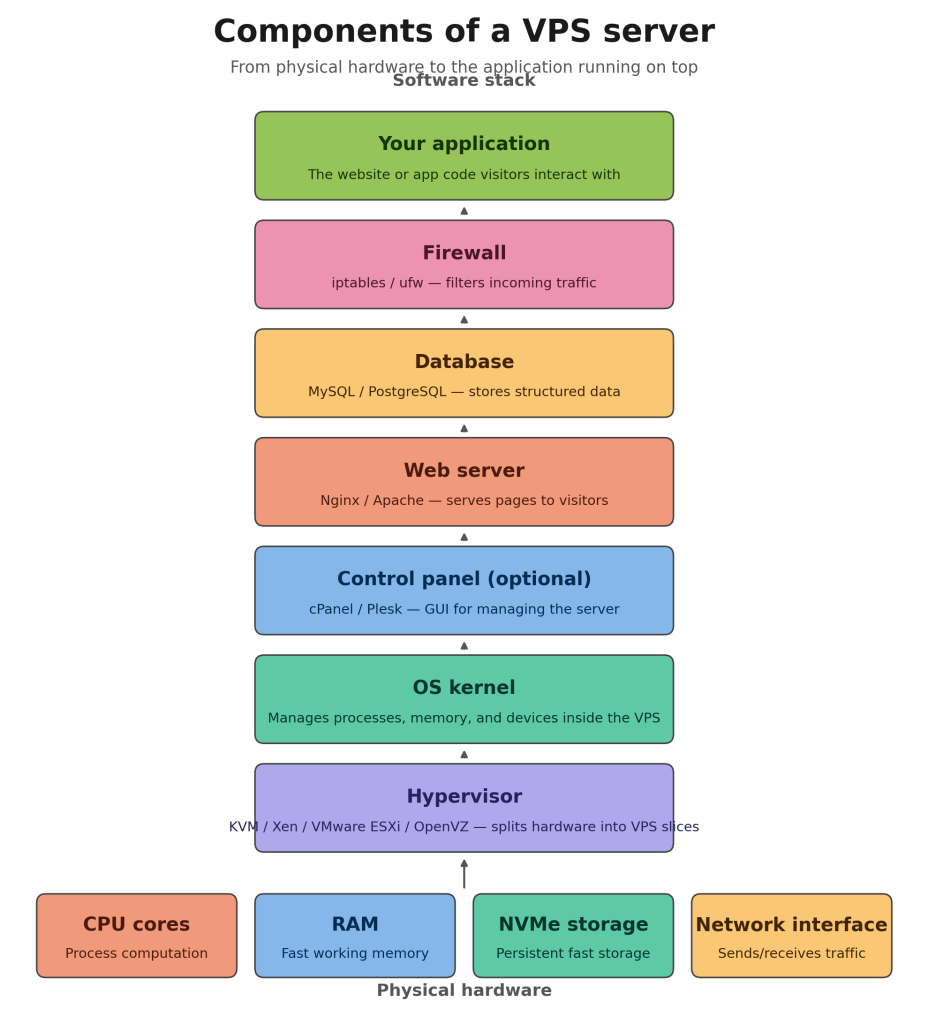
DigitalOcean’s VPS infrastructure is built on a production-grade virtualization stack that differs meaningfully from cheaper shared hosting providers. Understanding what runs beneath your Droplet helps you make better decisions about workload sizing, performance tuning, and security.
The Hypervisor: KVM
Every DigitalOcean Droplet runs on KVM (Kernel-based Virtual Machine), a hypervisor built directly into the Linux OS kernel. KVM is a Type-1 (bare-metal) hypervisor — unlike Type-2 hypervisors that run on top of an existing OS, KVM operates at the kernel level, meaning there is minimal overhead between your Droplet and the underlying hardware.
This is architecturally distinct from hypervisors like Xen, which was historically dominant among cloud providers before KVM became production-ready, or VMware ESXi, which is popular in enterprise on-premises environments. It is also fundamentally different from container-based virtualization like OpenVZ, which shares the host kernel rather than providing true hardware virtualization. KVM gives each Droplet a fully isolated kernel namespace, its own virtual hardware devices, and the ability to run any Linux distribution — or even Windows — without sharing OS-level resources with neighbors.
Hypervisor
KVM (Type-1) operates at the Linux kernel level, providing near-native CPU performance through hardware virtualization extensions (Intel VT-x / AMD-V).
KVM + QEMU
KVM handles CPU and memory virtualization; QEMU emulates virtual hardware devices. Together they deliver full VM isolation without the overhead of hosted hypervisors.
OS Kernel
Each Droplet boots its own independent Linux kernel. Unlike OpenVZ, there is no shared kernel — your Droplet can load kernel modules, run custom kernels, and use iptables/nftables freely.
NVMe Drives
Premium, CPU-Optimized, and Storage-Optimized Droplets use NVMe SSDs. NVMe’s PCIe interface delivers far higher IOPS and lower latency than SATA SSDs — critical for database and I/O-intensive applications.
Dedicated vCPU
General Purpose, CPU-Optimized, Memory-Optimized, and Storage-Optimized Droplets pin virtual CPU cores exclusively to your VM. No CPU-steal from noisy neighbors.
Shared vCPU
Basic and Premium Droplets share physical CPU time with neighboring VMs. Efficient for low-traffic workloads, but CPU performance can vary during peak hours on the host.
Burstable vCPU
Basic Droplets can burst above their baseline CPU allocation when excess capacity is available on the physical host — useful for handling short traffic spikes without paying for dedicated vCPUs.
CPU Cores
DigitalOcean’s physical hosts use modern Intel and AMD server processors. Dedicated Droplets map vCPUs 1:1 to physical CPU threads; shared Droplets oversubscribe CPU at a ratio designed to maintain acceptable burst performance.
RAM
Droplet RAM is fully dedicated to your VM — it is not shared with other tenants. Memory is mapped directly through the hypervisor’s Extended Page Tables (EPT), keeping virtualization overhead under 2%.
Networking Architecture
Each DigitalOcean data center uses a multi-layer network fabric built on top of physical 10/25/100 Gbps switches connected by high-capacity backbone links. Droplets are provisioned with a private VPC interface (for intra-datacenter communication at no bandwidth cost) and a public IPv4 interface. IPv6 is available and uses the public interface for all traffic. All inter-datacenter VPC peering traffic is billed at $0.01/GiB, while intra-datacenter VPC traffic is free.
DigitalOcean’s uplink infrastructure connects to Tier-1 transit providers and peers at major internet exchange points in each region. In New York, this includes connections through Equinix; in Amsterdam through AMS-IX; in Frankfurt through DE-CIX; and in London through LINX. This private peering reduces latency and improves reliability compared to purely transit-dependent providers.
Virtualization vs. Competitors
To understand why DigitalOcean’s KVM stack matters, it’s worth contrasting it with the alternatives. Xen — used historically by AWS EC2 before its migration to Nitro — requires a privileged Dom0 domain that manages hardware on behalf of guest VMs, introducing an additional software layer. VMware ESXi is a proprietary Type-1 hypervisor with excellent enterprise tooling but significant licensing costs that pass through to cloud pricing. OpenVZ uses OS-level container virtualization rather than hardware virtualization — it is fast and efficient but does not provide true kernel isolation, limiting what workloads it can support and disqualifying it for serious production use.
KVM’s primary advantages are its deep Linux integration, hardware-level isolation, active upstream kernel development by Red Hat and the broader community, and its zero licensing cost — all of which contribute to DigitalOcean’s ability to offer premium virtualization at competitive prices.
Compliance and Certifications
DigitalOcean is certified under AICPA SOC 2 Type II and SOC 3 Type II across its data center infrastructure. These certifications audit the security, availability, processing integrity, confidentiality, and privacy controls of DigitalOcean’s systems on an ongoing basis, making Droplets suitable for regulated workloads including healthcare-adjacent applications, financial services, and B2B SaaS with enterprise procurement requirements. DigitalOcean’s Trust Platform at digitalocean.com/trust provides access to certification reports, transparency disclosures, and GDPR documentation.
Common Questions
Frequently Asked Questions About DigitalOcean Data Centers
How many data centers does DigitalOcean have in 2026?
DigitalOcean operates 14 active data centers across 11 regions as of mid-2026. These span the United States (NYC1, NYC2, NYC3, SFO2, SFO3, ATL1, RIC1), Canada (TOR1), Netherlands (AMS3), United Kingdom (LON1), Germany (FRA1), Singapore (SGP1), India (BLR1), and Australia (SYD1). Two additional legacy data centers — AMS2 and SFO1 — remain operational for existing users but are closed to new resource creation.
Does DigitalOcean charge different prices in different data centers?
No. DigitalOcean uses flat, uniform pricing across all data centers. A $24/month Droplet in New York costs exactly the same as the equivalent Droplet in Singapore, Frankfurt, or Sydney. This is a deliberate pricing choice that simplifies budgeting and removes any financial penalty for choosing the region closest to your users.
Can I move a Droplet from one data center to another?
You cannot migrate a running Droplet directly between data centers. However, you can take a snapshot of your Droplet and then use that snapshot to create a new Droplet in a different region. Snapshots are stored centrally and can be transferred to any DigitalOcean region. You will be billed for the snapshot at $0.06/GB per month during the transfer period.
Which DigitalOcean data center is best for Africa?
DigitalOcean does not currently operate a data center on the African continent. For East African audiences (Kenya, Tanzania, Uganda, Ethiopia), SGP1 (Singapore) often delivers the best latency due to the SEACOM and EASSy undersea cable routes through the Indian Ocean. For West and North African audiences or those targeting the MENA region, AMS3 (Amsterdam) is typically the better choice, with connectivity through the SAT-3/WASC and TEAMs cable systems. Running a latency test from your target location is the most reliable way to confirm this for your specific use case.
What is the difference between a DigitalOcean region and a data center?
A region is a geographic location — a city or metropolitan area — where DigitalOcean has physical infrastructure. A data center is a specific facility within that region. New York City, for example, is a region; NYC1, NYC2, and NYC3 are three separate data centers within that region. The distinction matters because some products — like VPC networking and load balancers — can span multiple data centers within the same region, but cannot span across different regions without additional configuration.
What hypervisor does DigitalOcean use?
DigitalOcean uses KVM (Kernel-based Virtual Machine) as its hypervisor. KVM is a Type-1 hypervisor integrated into the Linux OS kernel. It provides full hardware virtualization using Intel VT-x or AMD-V CPU extensions, giving each Droplet a fully isolated virtual machine with its own independent kernel — unlike container-based virtualization solutions like OpenVZ.
Is there a DigitalOcean data center in the Middle East or Africa?
As of June 2026, DigitalOcean does not operate data centers in the Middle East or Africa. The company has been expanding its network — with Atlanta and Richmond added in 2025–2026 — but its growth has focused on AI infrastructure rather than new geographic coverage. For businesses that require data residency specifically in the Middle East or Africa, a provider with local infrastructure such as AWS (Bahrain, Cape Town, Johannesburg) or Hetzner (Helsinki, Falkenstein) may be more appropriate, though they come with higher price points or different developer experience tradeoffs.
What is the DigitalOcean uptime SLA?
DigitalOcean offers a 99.99% monthly uptime Service Level Agreement (SLA) for its Droplet compute services. This translates to a maximum of approximately 52 minutes of unplanned downtime per year. In the event of SLA breach, DigitalOcean provides service credits as compensation. The SLA applies per Droplet and full terms are available on DigitalOcean’s SLA page at digitalocean.com/sla.
